


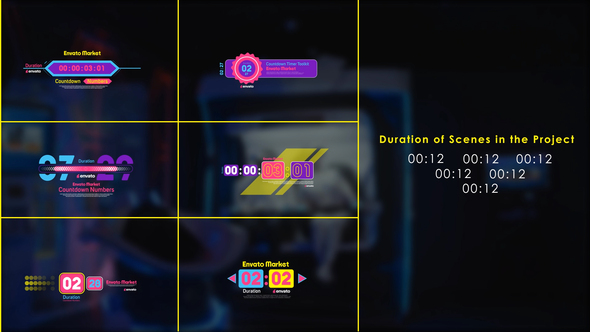
Free Download Digital Countdown Numbers and Timer Toolkit. Create stunning digital countdown timers with this toolkit in Adobe Premiere Pro. Perfect for events, videos, and live streams, it offers colorful, animated numbers and comprehensive color control. Designed for seamless use, it includes 23 text placeholders and one logo placeholder, with fast rendering and no plugins required. Ideal for New Year’s countdowns, YouTube promos, and more, this tool ensures vibrant, modern visuals.
Overview of Digital Countdown Numbers and Timer Toolkit
Create stylish digital countdowns for your events and videos using the Digital Countdown Numbers and Timer Toolkit. This Adobe After Effects and Premiere Pro template provides colorful, animated countdown numbers with full color control and various styles. Perfect for sporting events, YouTube promos, and live shows, it features 23 text placeholders and one logo placeholder. No plugins required, ensuring fast rendering in 1920×1080 resolution. The toolkit includes a tutorial for easy setup, making it ideal for quick, professional results.
Features of Digital Countdown Numbers and Timer Toolkit
- Seamless Integration: Works with Adobe After Effects and Premiere Pro 2021 and above.
- Features colorful animated countdown numbers with a variety of styles.
- Full color control allows for complete customization to suit any event or theme.
- Perfectly suited for sporting events, YouTube promos, gamer-streamer gear, and live shows.
- Includes 23 text placeholders and one logo placeholder for personalized content.
- No plugins required, ensuring fast rendering in 1920×1080 resolution.
- Easy setup with a detailed tutorial included.
- Ideal for rapid production with short durations of 12 seconds each.
How to use Digital Countdown Numbers and Timer Toolkit
1. Open Adobe Premiere Pro and start a new project.
2. Import the Digital Countdown Numbers and Timer Toolkit template file into your project.
3. Drag the template into the timeline.
4. To customize text, select the text placeholders in the timeline panel and adjust content in the Essential Graphics panel.
5. Click on the Effects Control panel to access color controls for customization.
6. Replace the logo by selecting the logo placeholder and importing your logo into the project. Drag your logo onto the placeholder and adjust its size and position.
7. Use the color controls to match your event’s theme by adjusting hues and shades.
8. Preview the sequence to ensure all elements fit your requirements.
9. Export the final video by selecting File > Export > Media and choose your desired settings.
💬 Comments
0 commentsNo comments yet. Be the first to comment!
You must log in to comment.