


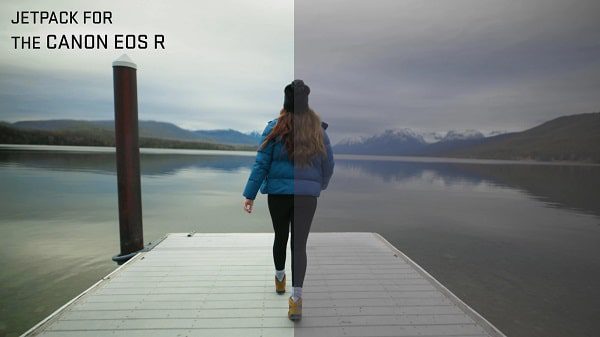
Canon Eos R JetPack Lut Set – Potato Jet
I designed these LUTs to optimize the look out of my Canon EOS R and here are my recommended settings.
- Canon Log – The default settings are good (EOS Original Color Matrix & Characteristics at 0,0,0). This will give you a lot of dynamic range and flexibility with your footage. In this setting, definitely shoot with the best codec you have available. (For Example ALL-I instead of IPB)
- Picture Profile Neutral – (Sharpness at +1 | Contrast at -3 | Saturation at -3 | Color tone at 0). This will look decent straight out of camera but by pulling back the contrast and saturation, that gives a bit more room to work. I often use this with the lighter codec since it won’t go through any intensive color grading. Nice in case you need to record for a long time and don’t want to overflow your hard drives.
Depending on which color profile you filmed with, open up the corresponding folder and you’ll find 5 LUTs to choose from.
- Cinema Jet pack-This was designed specifically to match higher end cameras such as the RED or Arri Alexa. It’s currently my GO TO LUT.
- Equator – A gentle warm look. I love using this one in nature or when I’m traveling to tropical destinations. If there’s a pina colada in the shot, this is the LUT to use!
- LAPD – A dark cod desaturated rugged look. I like using this LUT when I’m in urban areas surrounded by skyscrapers.
- Quickfix – This is a very basic LUT which will get your footage looking ready from C-Log or Neutral. Simple but effective when you’re not looking to stylize much.
- SilverLake – The Trendy Hipster Look which makes everything look like a music festival. Throw in some Electronic Music, drop in this LUT.
💬 Comments
0 commentsNo comments yet. Be the first to comment!
You must log in to comment.